The decision this helps you make
A list that says “team, product, workplace” leaves a photographer with many unanswered decisions. A practical production brief identifies the purpose of each image group, what needs to be available and how the files will be used. This template helps a business prepare for a commercial photography conversation. It does not define a universal shot count or price. It helps the team explain the scope so a photographer can propose an appropriate approach and identify unanswered questions.
Connect desired images to access and destination. A website hero, catalog detail and employee portrait may need different framing and preparation. Google’s Business Profile photo guidance is one example of a destination with its own standards; other uses need their own checks. The six-part brief below is an original coordination template, not a claim that one capture or export specification works everywhere.
A photography brief becomes a production plan when each desired image is connected to a subject, use and decision owner.
The working model
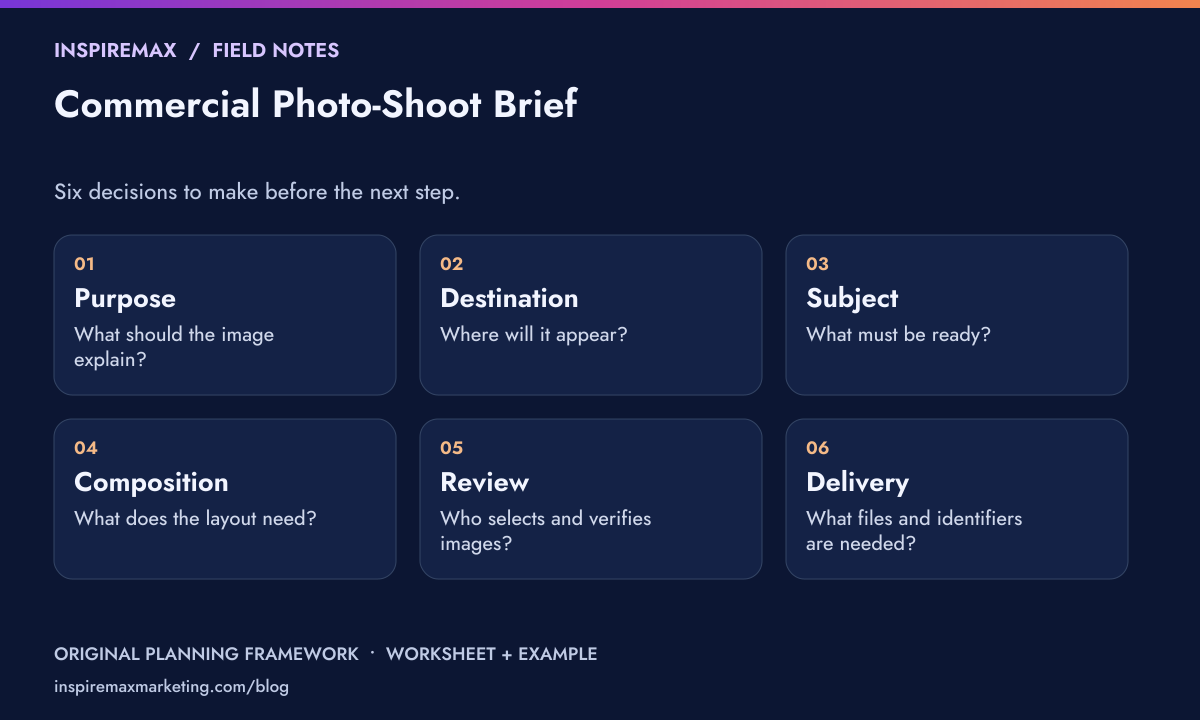
Six decisions to record
Use the questions below with the actual project information. The examples are illustrative, not client results. Download the CSV to record your answers, supporting information, decision owner and status.
| Decision | Question to resolve | Illustrative example |
|---|---|---|
| Purpose | What should the image explain? | A product detail, team role or working process |
| Destination | Where will it appear? | A defined page section or campaign placement |
| Subject | What must be ready? | The actual product, participant or location |
| Composition | What does the layout need? | Orientation, useful space and visible details |
| Review | Who selects and verifies images? | One coordinated selection and factual review path |
| Delivery | What files and identifiers are needed? | Agreed exports, names and approval status |
Step 01
Describe where the images will work
List the page sections, campaign formats and other intended uses. Note text overlays or crops that affect composition. A clear use case helps the photographer plan space around a subject without guessing which side a headline will occupy.
Step 02
Prepare subjects and locations
Identify the products, people, rooms or activities involved and who can make them ready. Record access limits and the person who can resolve questions on the day. Treat a missing sample or unavailable participant as a planning dependency, not a detail to discover during setup.
Step 03
Agree selection and delivery decisions
Discuss how selections will be made, which retouching is included and how approved files will be identified. The final proposal should describe deliverables and usage arrangements. Keep the brief available during review so the image set is assessed against its intended purpose.
Apply the method
A worked example
Illustrative example: a team requests new workplace photos for a homepage and recruitment page. The brief reveals that the homepage needs space for a headline, while recruitment content needs a more detailed picture of daily work. The same broad “workplace” label conceals two different jobs. Add the intended use beside each image group, arrange participant availability and identify who can approve what is shown. Those decisions give the photographer something concrete to plan.
Before you call it complete
- Does each image group have an intended use?
- Are real subjects and locations available?
- Are composition needs explained?
- Is review responsibility clear?
- Does the agreed scope identify finished deliverables?
Reference and attribution
This is an original InspireMax editorial framework, with a primary reference for the related guidance: Google Business Profile: photos and videos ↗. The worksheet and examples are planning aids, not measured performance benchmarks.
Cite this resource
InspireMax Marketing. “The Commercial Photo-Shoot Brief: Turn an Image Wish List Into a Production Plan.” November 9, 2026. https://inspiremaxmarketing.com/blog/commercial-photo-shoot-production-brief/
Found something that needs correction? Tell us which resource and detail to review.
Put the plan to work
Planning a project in Greater Milwaukee?
InspireMax brings strategy, design and production together. Tell us what you are trying to accomplish, what you already have and the timing you are considering. We will discuss the scope and practical next steps.