The decision this helps you make
An internal link should help a reader continue a task, not merely connect two pages because they share a keyword. The opportunity map starts with the current page, the question someone may ask next and the destination that answers it. It is useful after adding service pages, publishing a resource library or finding isolated articles. Use it to identify a small set of meaningful links before changing navigation or adding a long block of repeated links to every page.
Map a reason for the connection. Google recommends crawlable links and descriptive anchor text that helps people understand the destination. Our worksheet turns that guidance into a page-level review: the link has an origin, a reader need, an appropriate target and a clear label. It is not a formula for a ranking increase or a requirement to force every keyword variation into an anchor.
A useful internal link connects the page someone is reading with the question they are ready to ask next.
The working model
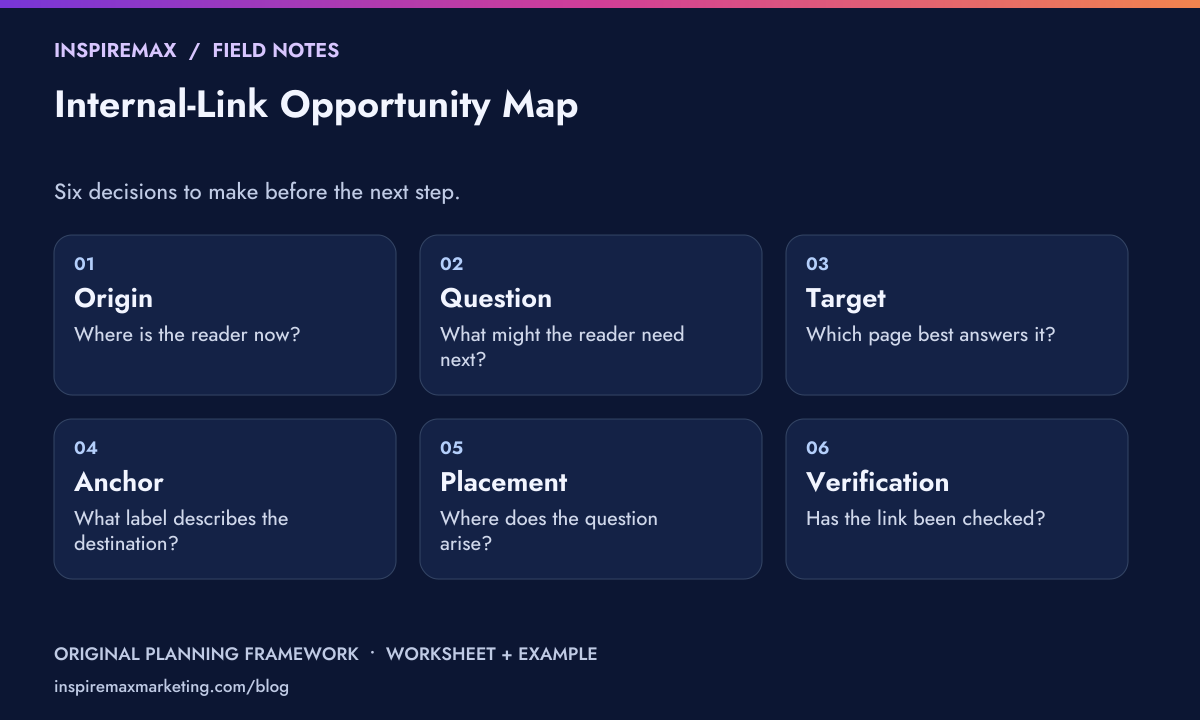
Six decisions to record
Use the questions below with the actual project information. The examples are illustrative, not client results. Download the CSV to record your answers, supporting information, decision owner and status.
| Decision | Question to resolve | Illustrative example |
|---|---|---|
| Origin | Where is the reader now? | A specific article or service URL |
| Question | What might the reader need next? | How to prepare a video brief |
| Target | Which page best answers it? | The relevant planning worksheet |
| Anchor | What label describes the destination? | Download the video-brief worksheet |
| Placement | Where does the question arise? | Beside the paragraph explaining preparation |
| Verification | Has the link been checked? | Confirm destination, context and functionality |
Step 01
Choose a page and a reader task
Read the page as someone deciding what to do next. A planning article might lead naturally to a detailed worksheet or a relevant service. A portfolio page might need a route to project scoping rather than another broad article.
Step 02
Select the strongest destination
Check that the target exists, answers the stated question and is the intended canonical destination. If several pages seem interchangeable, resolve that ambiguity rather than adding links to all of them. Consider whether the target also needs a useful route back into the site.
Step 03
Write and test the link in context
Use wording that describes the destination without relying on vague phrases. Keep the surrounding sentence readable. Test the URL, mobile placement and keyboard access. A source spreadsheet is helpful only when the actual implemented link behaves as expected.
Apply the method
A worked example
Illustrative example: a product-photography article describes planning different views. A useful link points to an angle-matrix worksheet at the moment that planning question arises. A generic “click here” label at the bottom of every page gives less context. Record the origin, anchor and purpose in the map, then review the live result. If the resource moves later, the map also provides a practical list of places that may need updating.
Before you call it complete
- Does each proposed link have a reader-centered reason?
- Is the target the intended destination?
- Does the label make sense in context?
- Are important resources reachable without search?
- Has the implemented URL been tested?
Reference and attribution
This is an original InspireMax editorial framework, with a primary reference for the related guidance: Google Search Central: crawlable links and anchor text ↗. The worksheet and examples are planning aids, not measured performance benchmarks.
Cite this resource
InspireMax Marketing. “The Internal-Link Opportunity Map: Connect the Reader's Next Question.” November 8, 2026. https://inspiremaxmarketing.com/blog/internal-link-opportunity-map/
Found something that needs correction? Tell us which resource and detail to review.
Put the plan to work
Planning a project in Greater Milwaukee?
InspireMax brings strategy, design and production together. Tell us what you are trying to accomplish, what you already have and the timing you are considering. We will discuss the scope and practical next steps.