The decision this helps you make
A button can be visually prominent while the next step remains confusing. The visitor may reach an unrelated form, an unexplained scheduling screen or a confirmation that does not describe what happened. This path audit follows a single call to action from its surrounding message through completion. Use it on a homepage, service page or campaign landing page. It helps separate an attractive component from a complete inquiry experience and gives a team specific defects to fix.
Review the promise, destination and completion together. Google recommends link text that helps people understand where a link leads. Our worksheet expands the review to the whole action path, including the reason for clicking and the information requested afterward. The goal is an understandable journey; the checklist does not predict a conversion increase or replace testing with actual visitors.
A call to action is a promise about the next experience, not merely a style applied to a link.
The working model
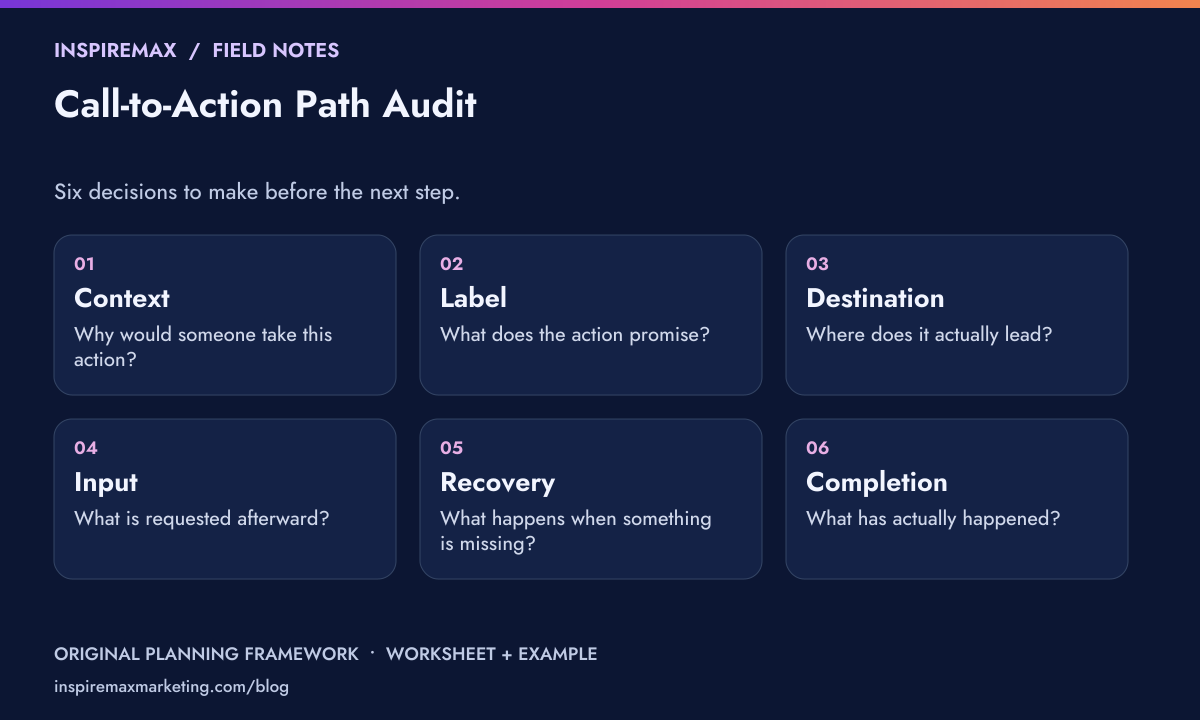
Six decisions to record
Use the questions below with the actual project information. The examples are illustrative, not client results. Download the CSV to record your answers, supporting information, decision owner and status.
| Decision | Question to resolve | Illustrative example |
|---|---|---|
| Context | Why would someone take this action? | A relevant service question or project need |
| Label | What does the action promise? | A clear description of the next step |
| Destination | Where does it actually lead? | The appropriate section, page or workflow |
| Input | What is requested afterward? | Only information needed for that stage |
| Recovery | What happens when something is missing? | Understandable errors and retained input |
| Completion | What has actually happened? | A truthful confirmation with a clear next step |
Step 01
Read the button with its context
Identify what the paragraph and label lead a person to expect. “View work,” “request a quote” and “contact us” describe different next steps. Make sure qualifications or limitations that affect the action are explained where the visitor needs them.
Step 02
Follow the actual destination
Test the link rather than assuming its address is correct. Check mobile behavior, page anchors, the opened component and any change of domain. If the visitor reaches a form, read the form introduction as a continuation of the original message.
Step 03
Verify completion and recovery
Check what happens when a required answer is missing and when the action succeeds. A completion state should describe reality. If the action starts a discussion, do not imply an appointment or price has been confirmed when it has not.
Apply the method
A worked example
Illustrative example: a service page offers “See our video work,” but the button opens the general contact form. That is a mismatch even if the form itself is well designed. Point the work-viewing action to relevant portfolio material and keep a separately labeled inquiry action. Then test both on a phone and with keyboard navigation. The repair should be verified along the complete path, including whether the destination heading gives the visitor a clear sense of arrival.
Before you call it complete
- Does the label describe the actual next step?
- Is the destination relevant?
- Does the path work on a narrow screen?
- Can the visitor recover from errors?
- Does completion language reflect what actually occurred?
Reference and attribution
This is an original InspireMax editorial framework, with a primary reference for the related guidance: Google Search Central: crawlable links and anchor text ↗. The worksheet and examples are planning aids, not measured performance benchmarks.
Cite this resource
InspireMax Marketing. “The Call-to-Action Path Audit: Follow the Journey After the Button.” November 12, 2026. https://inspiremaxmarketing.com/blog/call-to-action-path-audit/
Found something that needs correction? Tell us which resource and detail to review.
Put the plan to work
Planning a project in Greater Milwaukee?
InspireMax brings strategy, design and production together. Tell us what you are trying to accomplish, what you already have and the timing you are considering. We will discuss the scope and practical next steps.